Search This Blog

Showing posts with label Google. Show all posts

Thursday, 28 April 2011

Thing 12: Google docs


We use Google docs as a team quite a lot.  The various Google doc applications allows you to share spreadsheets on which you can all collaborate without worrying about version control, write a report together from miles apart while chatting using the in-built instant messager, and save and edit presentations amongst other things. One of its main advantages is collaboration.  As we get a Google Apps account as part of our Westminster University IT package it seems a natural thing to use these as a tool in our working lives.  

We also recently created profile pages for our team- Google sites gave us the flexible to create a simple website and then share it with other team members so that they can hold the rights to edit their own pages as they wish.

I also like using it just as a storage for documents.  I remember at Uni frequently emailing myself essay drafts from the library as I had forgotten to take anything to save them on, getting back to my laptop only to curse myself for not saving it as a text document having realised I didn't have the same version of Word as the Uni computers.  Now all you need to do is log into your Google account and upload your latest oeuvre to work on later. Storage space for documents you can access from anywhere with an internet connection- another huge advantage.

One of the main disadvantages has always been functionality- that was never going to be its main winning feature against the likes of Microsoft.  However Google are even trying to lure those still clinging to Office with Cloud Connect- this allows you to download a plug-in for Office so that you can work within the Micrsoft Office environment while using the plug-in to save&sync those documents to the Google Cloud.  These documents can then also be shared and simultaneously edited by multiple people, from within Office, thus mixing the functionality/familiarity advantages of Office with the collaborative/sharing advantages of Google Docs. As you have to have admin rights to download this onto Uni computers I am unable to test this out but this seems like something as a team we should investigate to see if it gives us the advantage of the collaboration we have got used to with the added benefits of being able to create something from within Office.

Thing 12 summary: The advantages to using Google docs have always been very clear to me, the added value it brings is probably why it is the Thing most heavily used by our team.  It will be interesting to see what effect our new content management system, Alfresco, which also has tools to allow collaborative documents, has on our use of Google.  I would also be interested to see how Cloud Connect could be used.

Photo: Bluebell in Lower Benefield, Northamptonshire taken by Ellie

Friday, 18 February 2011

Thing 9: create your own search engine


I found this "thing" quite frustrating.  I created my Rollyo (roll your own search engine) quite easily; I decided to create a search engine for the 23 things participant blogs.  I added the search box onto my blog and liked the look of it (reminds me of those sweets you can roll out).  I can see how this is really useful in this particular circumstance and for narrowing down searches.  For example: want to know what Westminster participants thought of Flickr? Do a search on my Rollyo and see everyone's Flickr related thoughts in one fell swoop.  Well, that's the theory.  I, like another Wmin23 participant, found that it was only retrieving results from a couple of the blogs (mine prominently), even though I knew it should retrieve more. 

Call it my generation Y tendencies but I wasn't going to sit there to figure out what was going on with this tool when a click away is Google......So next stop- Google customised search, same principle as the above but Google not Yahoo!  I have added the search box underneath the Rollyo one. I admit I have a slight love of all things Google and love adding extra Google tools to my portfolio but even trying to be unbiased the advantages for me were:
  • I already have a Google account which I use for many tools and regularly so am unlikely to forget the username and password (tempting fate there)
  • There didn't seem to be a limit to the number of sites to add to the custom search (unlike Rollyo's 25) although it's possible I just didn't hit the limit but it's certainly more
  • You can colloborate so others can contribute sites to your custom search- which I think is an extremely useful feature
  • It worked
I guess the last one is pretty essential.  I don't know what went wrong with the Rollyo one, maybe it was user error and maybe I'm missing something really obvious but still, if you search "Flickr" in the Rollyo one and then "Flickr" in the Google one you will see the difference (unless it really is just me.....).  The only gripe I have about adding the Google search box was that when I added the HTML coding to my blog it changed the main search box, the one that searches only my blog, to the style I had chosen for the customised search box.  Now it looks a bit weird and I can't change it.  But usability over aesthetics.  Also I did like the fact that for the Rollyo search box you can create different collections of websites and choose to search any of those collections from the one search box. 

Summary of thing 9: I liked the concept in theory, it works well for a scenario like this but I think the usefulness might be limited.  The tool let me down slightly but Google came to the rescue (as if they need the ego boost).  I guess for work I could collect together, for example, fashion websites and provide the narrowed down search for them.  Now talking of collecting websites together, I feel like another "thing" coming on......

Picture: crocuses in Harrogate taken by Ellie Murphy

Tuesday, 21 September 2010

Thing #3 cont. : a pertinent post


As part of 23 things we were asked to reflect on a piece of reading gleaned from our Google reader. 

My subscribed blogs fall mostly into the following categories:
  • Library related blogs from both blogging librarians and library blogs (e.g. The Distant Librarian ; ad-lib; CJBS Information & Literacy blog ; Libraries of the future ).  Such blogs keep me aware of what is happening at other libraries and gives me ideas for things I might want to blog about.  Though mostly I get this sort of information by following libraries and librarians on Twitter, rather than via blogs.
  • Westminster Uni blogs (both the Academic Liaison Librarian blogs and the 23 things blogs).
  • Blogs from the suppliers of some of our main e-resources (Warc blogs ; WGSN News ; Mintel's Market Size blog).  Again these blogs are most useful for getting ideas for our own business blog and for getting alerts for new reports that we might want to tell staff/students about.  
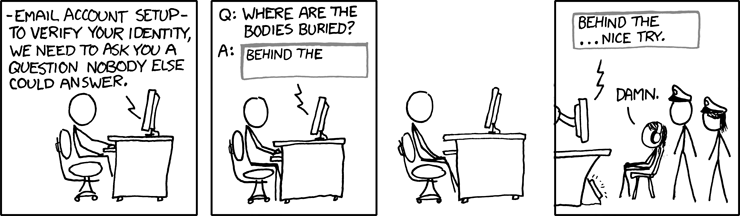
  • Personal interest blogs (Ricky Gervais' blog, Shepherds Bush blog- often worrying reading, and xkcd (a brilliant webcomic, see picture above).
The post I have chosen is one from the blog "Beyond the Reference Desk".  I can't now remember where I found out about this blog, I have a feeling it may have been one Google reader suggested for me based on the fact that I subscribe to several library blogs.  It is written by an academic Information Literacy librarian based in New York.

A recent post concerned the hacking of her Google account and subsequent loss of access to all her vital Google services and the information therein.  She was locked out of her Google account for 5 weeks.  I think it's fairly clear from my own blog that I, like this blog author, have a heavy reliance on Google and all its various functions.  However, I tend to be one of those "it'll never happen to me and I'll just deal with it when it does" type people and I do tend to back up most things too.  The thing that most worried me from this post was learning about the questions Google asks you to regain access to your account.  If I got these questions I'd be struggling big time, they'd be marking me down as the hacker before I could whimper "I can tell you what my favourite Google Doodle is though".  

It's so easy to set up new accounts that I have probably signed up to way more than I can count, let alone remember.  Also for every service you want to use online you have to have a new account; I had a letter undelivered yesterday because it required extra postage.  Pay online, it said.  So simple, I thought.
......Fill in all my details, what the 'sorry this wasn't delivered card' said etc.  Choose a password.  Hit Enter.  You already have an account.  Right, OK.  Enter several of the passwords I use most often.  You have now been locked out of your account, a new password has been sent to your email address.  Sign into email account.  Go back to Royal Mail with new password.  Your account has been locked.  Start to get tense.  Create a whole new account with different email address.  Fill in all my details again.  Pay £1.10 to get mail delivered (inclusive of £1 admin charge).  Consider that this whole charade could have been avoided by visting the post office down the road...........

Our 23 things so far has been quite Google heavy (coupled with the fact that we all have a University Google account) so I thought this post was quite an apt reminder of the potential stormy nature of The Cloud.

Thing #3 summary: a good way to information gather and get useful updates. Having said this I do prefer Twitter as an information gathering tool and I will discuss that when we get to the Twitter Thing.  Re-looking at my Google reader account for these 23 things has allowed me to discover the bundle function which I think could be really useful to collect together subject blogs (i.e. Marketing blogs or Retail blogs) and forward them on to interested parties. 

Image credit: XKCD licensed under the Creative Commons by-nc