Search This Blog

Showing posts with label blogs. Show all posts

Friday, 17 June 2011

Upwardly mobile....


Hurrah!  Just discovered that Blogger now makes it very easy to make your blog mobile friendly.  To make your blog mobile friendly just go to settings-> email & mobile, select yes to "on mobile devices" and save those settings.  To see the mobile version of this blog enter its URL into your mobile browser or zap the QR code below.


Pic: Lincolnshire from a balloon taken by Ellie

Wednesday, 9 March 2011

Thing 11: Technorati


I am quite glad this Thing came along now, firstly because it follows on from my previous posts about raising the blogs' visibility and secondly because it findly reminds me to add this code into a post: Q3NVXVBSKQMT

I registered all my blogs on Technorati a while ago and I managed to stick the codes surreptitiously (hah!) into the bottom of some posts on my other blogs but kept forgetting on this blog.  Adding this code will mean that Technorati will now believe me when I told them I am the author of this blog.  I mentioned Technorati when I was talking at our team day about raising the blogs' visibilty externally; Technorati indexes blogs and ranks them according to their authority (based on how much the blog is referenced by other sites and in-bound links), you can then display your ranking (if it's something to be proud of) on your blog.  So now all my blogs are indexed by Technorati and thus exposed in the wider blogosphere that little bit more.  Actually, having just logged in, I realised that my fashion business blog still hasn't been registered so I will get onto that.....

Another site which offers a very similar service is Wikio.  Wikio's emphasis is more on news stories, calling itself a news search engine, but it also does feature a blog ranking section.  There are some differences in the way Technorati and Wikio rank blogs but as I am not likely to get very high in the rankings I'm not too worried about the differences.  What I did notice though was that on Wikio it was a lot easier for me to register my blogs.  You can do it here.  You don't have to register for an account and there was none of this having to fit a claim code in your posts.  Having said that, thinking it about it again, I have no idea what happened after I registered my Wikio blogs and I can't find them so again more investigation is needed.......

From the other perspective I honestly don't think I would ever use sites like these to find blogs of interest; I would take recommendations from friends/colleagues, blogs I read or just by doing a general search.  But in the name of 23 things I tried a search. I searched for fashion management/fashion business/retail blogs to add to my fashion blog "blog-roll".  Initially the search wasn't much good- a lot of vaguely related blogs of little authority, however I managed to find the "refine" button, which was actually very useful as it allowed me to see only high authority blogs and choose a particular category.  This narrowed the search well down and I found a few good blogs but wasn't hugely successful.  I then tried a browse to find the highest ranked music blogs, nothing particularly inspiring.  Searched for posts on "David Ford" and found nothing.  Started to want to give up.  Then I did a search for Classics and came across the brilliant Mary Beard's Times Online blog.  I found out from this that she taught Latin as part of Jamie Oliver's Dream School (though has featured very little so far). It's great that Latin was included as part of this Dream School- it could do with a bit of a boost, and I hope she features more later in the series.  

Summary of thing 11: A good way to easily raise the visibility of your blog and direct a wider audience towards you.  For finding blogs I didn't find it that useful so will look forward to read other 23 thing-ers posts to see if I've missed something.  I have come across Mary Beard's blog in the past so I can't claim Technorati did a lot here but in this instance I suppose it did get me to the blog and has reminded me to add it to my RSS feed.  So a small amount of success.....

Photo: Fish at London Zoo taken by Ellie

Back to blogging 2


Following on from my previous post on this topic, here are some of the tools I have used to raise my blogs' visibility and to promote it externally:

Feedburner: Feedburner is a service which provides several different tools to help promote and manage your blog.  There are other individual services that will allow you to do similar things to Feedburner but I prefer Feedburner as it provides all these services under one roof.  For example, the optimize tab of Feedburner features several services to enhance your blog and reach a wider audience.  Activate them and let Feedburner do the work for you.  Plus now it is owned by Google I don't have to remember a separate username and password to my Blogger account- always a bonus. In addition, Feedburner provides stats for your blog and you can also manage more than one blog from your Feedburner account. There's lots to explore on Feedburner, but I will mention the parts I have found most useful.
To do: Sign in to Feedburner using your Google username and password or register for an account. In Feedburner enter the URL to your blog where prompted, select your RSS feed, Feedburner will then give you the option to choose a name for your feed and a new feed address.  For example I chose http://feeds.feedburner.com/evolutio as my feedburner feed URL for this blog.

Email subscription:  It is a good idea to put a link on your blog offering subscription by RSS but some people may not use RSS or may prefer to get the updates straight to their email inbox. Feedburner allows you to offer an email subscription to your blog; every time you post your subcribers will get the new post delivered to their inbox.
To do: Click on the Publicize tab and from the menu choose "subscription  management".
This will give you some HTML code which you can copy and paste into your blog, I chose to also add this into my Google site "profile page" so readers can automatically subscribe from there, without even having to go to the blog.  But the easiest thing to do, if you use Blogger like me, is to automatically add a widget- in "use as a widget in..." choose Blogger and this will set up your "subscribe via email" widget for you on your blog.  You can see mine (and subscribe) in the right-hand menu of this blog. Feedburner also provides a URL link which you can add to your email signature, offering email subscription from there.  Under your analyze tab you can see how many have subscribed and get a list of email addresses of your subscribers.

Automatic posting to Twitter: I already have a "work" Twitter account to which I post snippets of info and forward on things I have found, some of my academics follow me on Twitter so I am able to push content to them through this channel.  Feedburner allows you to automatically update your Twitter account every time you post to your blog.  Under their "socialize" tab you can add a Twitter account and then choose how you want your automatic posts to look. For example, for the business librarians' blog,  I chose for it to tweet the title of the post, a link back to the blog and for every tweet to be prefaced by "From WBS Librarians" to make it clear where the content originated.  The tweets appear like this: From WBS Librarians: Featured resource: FAME: How to do a peer analysis http://goo.gl/fb/abcd And that's it- content pushed to my Twitter audience, re-directing people back to the blog, and with no extra effort from me.  Services such as Twitterfeed also offer this, if you prefer not to use Feedburner.
To do: Click on the "publicize" tab and then from the menu choose "socialize".  Add your Twitter name (you need to register with Twitter beforehand) and then choose your formatting options, such as whether you want any text automatically added to the start or end of each Tweet.  For Tweets from this blog I have chosen to add #wmin23 before each Tweet as this is the Twitter tag we chose for the Westminster 23 things programme.
It just so happens that the next thing I was going to mention, Technorati, is our next "Thing" so stay tuned for the next post about that and Wikio......

Photo: on board Adventure of the Seas, somewhere in the Med., taken by Ellie

Wednesday, 23 February 2011

Back to blogging: promoting blogs


Not a Thing but Web 2.0 related....
During our team day recently I and some colleagues did a session on blogging. Many of the academic liaison librarian team write blogs to support their subjects; I write one for the fashion business courses I support and I collaborate with the two other business librarians on the blog to support Westminster Business School (WBS). My part of the session focused on promoting these subject-related blogs.  

It goes without saying that, with the effort we put into the blogs, we want to know there's someone out there reading them.  Earlier in the blogging session Jemma, one of the IT training team, had fed back on a survey she did of students, their knowledge of our blogs and what they thought of them.  One key thing that was highlighted was the visibility of the blogs- most of them thought it was a good idea but just didn't know about them.  I therefore wanted to look at how we can make the blogs more visible and where we can position ourselves in our effort to promote the blogs.

Where are the readers coming from?
Before the blogging session I checked the stats for our business blog.  Blogger has its own section for stats, where you can get information about how many people are visiting your blog, where they're coming in from (referring URL) and even what operating system they use.  Sitemeter and Feedburner offer similar services and we use these too.  Despite the dry nature of statistics it's actually pretty intruiging- for example, 94 page views this week on my fashion blog from France, more than the UK. The stats are also useful for identifying whether promoting the blog is working, what posts prove the most "readable" and to get some ideas of whether we have been promoting it in the right areas.

So I checked our traffic sources to see how readers had got to the business blog. This showed a range of different entry points including, amongst others, my LinkedIn account (where I have a gadget which automatically updates with new blog posts- I am linked to a few of the academics on this social networking site), Blackboard (our VLE- we have a page of useful library links on one of the module pages), a module leader's reading list webpage (which I previously had no knowledge of- a link to our blog was listed at the top), my Twitter account, and a page we had set up to promote our services on the WBS intranet pages.  There were also many who came in via a search engine.  You can even see what keywords they used in the search engine which took them to the blog.  Ours included "ISI dealwatch" "Mintel chocolate report" and "university of westminster infolinx mintel". There were several variations of the last example- InfoLinX was our previous e-resource platform, now superceded by "Library Search" which unfortunately isn't quite as "findable" when searching the internet as is "InfoLinX".......

Internal promotion
We have made a start in promoting it to academics and to students, this has mainly been on an ad-hoc basis- in coversations, via emails etc. The links appearing in Blackboard and on reading lists are a result of such conversations and really help in promoting to the students.  They are far more likely to look at something a lecturer tells them to, rather than me, and this is probably why the module leader's webpage (as mentioned above) is one of the top referring URLs.  

As a team in general we have tried to raise our profile on the intranet and, although we have a lot of work to do on increasing the visibility of such pages, some readers have managed to find their way to the blog that way.  On my personal profile page I have added both links to the blog and a link to subscribe directly via email from my profile page (they don't even have to visit the blog!).  I promote this profile page (which has all my contact details too) to students in training sessions and try to remember to point out the blog then.  

Another initative from the blogging team was to ask lecturers to contribute with guest posts, and to ultimately make the blogs fully collaborative with the Schools, making them school-based resources, rather than library-based resources. This would help promote the blogs, create further links between the Schools and the Library and give it a sense of authority. This is an aim of mine but very far from being fulfilled.  I have, however, posted an excellent guest post from the Honorary President of the Fashion Retail Club (a career networking online club run by University of Westminster for all fashion graduates and students around the world) for my fashion business blog.  Reflecting on this exercise I can see the benefits for liaison/relationship building as from me asking her to write a guest post she invited me to a promotion event for the club and we have discussed how we could work together in the future.

External promotion
The aim of looking at external promotion was to acknowledge the fact that the blogs aren't, at the moment, very visible.  They need to be visible both internally and externally because, from looking at the blog's referring URLs, the readers might be arriving at the blog from anywhere.

In the session I mentioned sites which would help with raising the blog's visibility externally such as Wikio and Technorati. I also talked about using tools like Feedburner and Twitterfeed to promote the blogs to social networking sites, such as Twitter.  These elements require a bit more pratical explanation and illustration and I am aware that my blog post is already far longer than the usual advice given for keeping a post concise.  I will therefore post on these elements soon, including how to set up a feed to Twitter and the tools to use to promote to the social web. 

The point I was trying to make mostly in this section of the session was there are several things that can be set up quite easily, which will run automatically with no extra effort from you and which will push blog content to the areas in which potential blog readers inhabit.  Thus you are positioning your blog for them to access in a time and place of their choosing. 

Keeping an eye on the stats
Having set all these things up it is important to keep an eye on the stats, and particularly the referring URLs, to monitor whether promotion has increased the number of visitors to the blog and whether this promotion has been in the right "place" i.e. have more come in from Twitter or from Blackboard.  With any luck the numbers will be up and the visibility raised!

The Prezi for my session can be found here.  I'd be interested to hear if anyone has any other ideas for promoting blogs and I promise to post some pratical tips soon.  

Picture: Last year's bounty taken by Ellie

Tuesday, 21 September 2010

Thing #3 cont. : a pertinent post


As part of 23 things we were asked to reflect on a piece of reading gleaned from our Google reader. 

My subscribed blogs fall mostly into the following categories:
  • Library related blogs from both blogging librarians and library blogs (e.g. The Distant Librarian ; ad-lib; CJBS Information & Literacy blog ; Libraries of the future ).  Such blogs keep me aware of what is happening at other libraries and gives me ideas for things I might want to blog about.  Though mostly I get this sort of information by following libraries and librarians on Twitter, rather than via blogs.
  • Westminster Uni blogs (both the Academic Liaison Librarian blogs and the 23 things blogs).
  • Blogs from the suppliers of some of our main e-resources (Warc blogs ; WGSN News ; Mintel's Market Size blog).  Again these blogs are most useful for getting ideas for our own business blog and for getting alerts for new reports that we might want to tell staff/students about.  
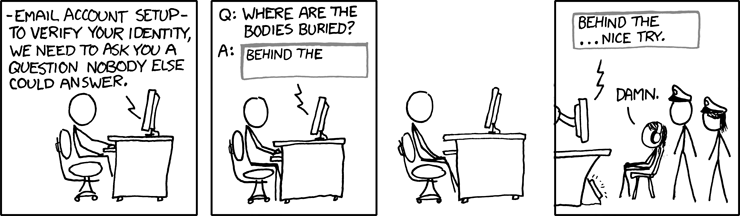
  • Personal interest blogs (Ricky Gervais' blog, Shepherds Bush blog- often worrying reading, and xkcd (a brilliant webcomic, see picture above).
The post I have chosen is one from the blog "Beyond the Reference Desk".  I can't now remember where I found out about this blog, I have a feeling it may have been one Google reader suggested for me based on the fact that I subscribe to several library blogs.  It is written by an academic Information Literacy librarian based in New York.

A recent post concerned the hacking of her Google account and subsequent loss of access to all her vital Google services and the information therein.  She was locked out of her Google account for 5 weeks.  I think it's fairly clear from my own blog that I, like this blog author, have a heavy reliance on Google and all its various functions.  However, I tend to be one of those "it'll never happen to me and I'll just deal with it when it does" type people and I do tend to back up most things too.  The thing that most worried me from this post was learning about the questions Google asks you to regain access to your account.  If I got these questions I'd be struggling big time, they'd be marking me down as the hacker before I could whimper "I can tell you what my favourite Google Doodle is though".  

It's so easy to set up new accounts that I have probably signed up to way more than I can count, let alone remember.  Also for every service you want to use online you have to have a new account; I had a letter undelivered yesterday because it required extra postage.  Pay online, it said.  So simple, I thought.
......Fill in all my details, what the 'sorry this wasn't delivered card' said etc.  Choose a password.  Hit Enter.  You already have an account.  Right, OK.  Enter several of the passwords I use most often.  You have now been locked out of your account, a new password has been sent to your email address.  Sign into email account.  Go back to Royal Mail with new password.  Your account has been locked.  Start to get tense.  Create a whole new account with different email address.  Fill in all my details again.  Pay £1.10 to get mail delivered (inclusive of £1 admin charge).  Consider that this whole charade could have been avoided by visting the post office down the road...........

Our 23 things so far has been quite Google heavy (coupled with the fact that we all have a University Google account) so I thought this post was quite an apt reminder of the potential stormy nature of The Cloud.

Thing #3 summary: a good way to information gather and get useful updates. Having said this I do prefer Twitter as an information gathering tool and I will discuss that when we get to the Twitter Thing.  Re-looking at my Google reader account for these 23 things has allowed me to discover the bundle function which I think could be really useful to collect together subject blogs (i.e. Marketing blogs or Retail blogs) and forward them on to interested parties. 

Image credit: XKCD licensed under the Creative Commons by-nc